Skip to the content

Hysaab Finance · for finance teams

Your finance team. Without changing your accounting system.

Hysaab Finance connects to your books, investigates discrepancies and prepares the work for your review: the payables, the reconciliations, the month-end close and its binder, and the reporting pack. Your team approves.

01 · What does it do?

Six parts, one set of books.
Prepared for you. Decided by you.

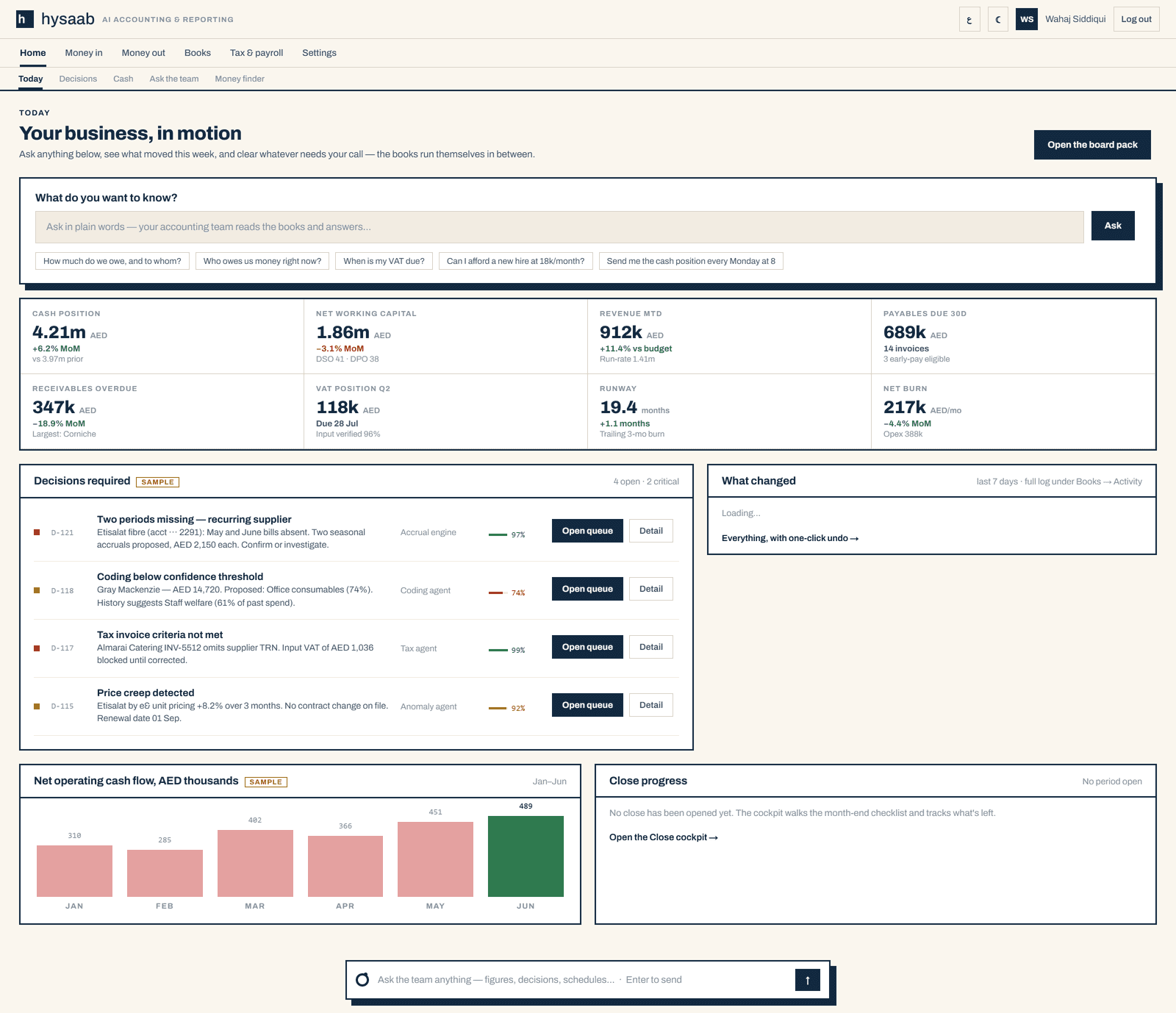
Each screen below is a capture of the Hysaab workspace running its sample dataset. Select any of them to see it in full.

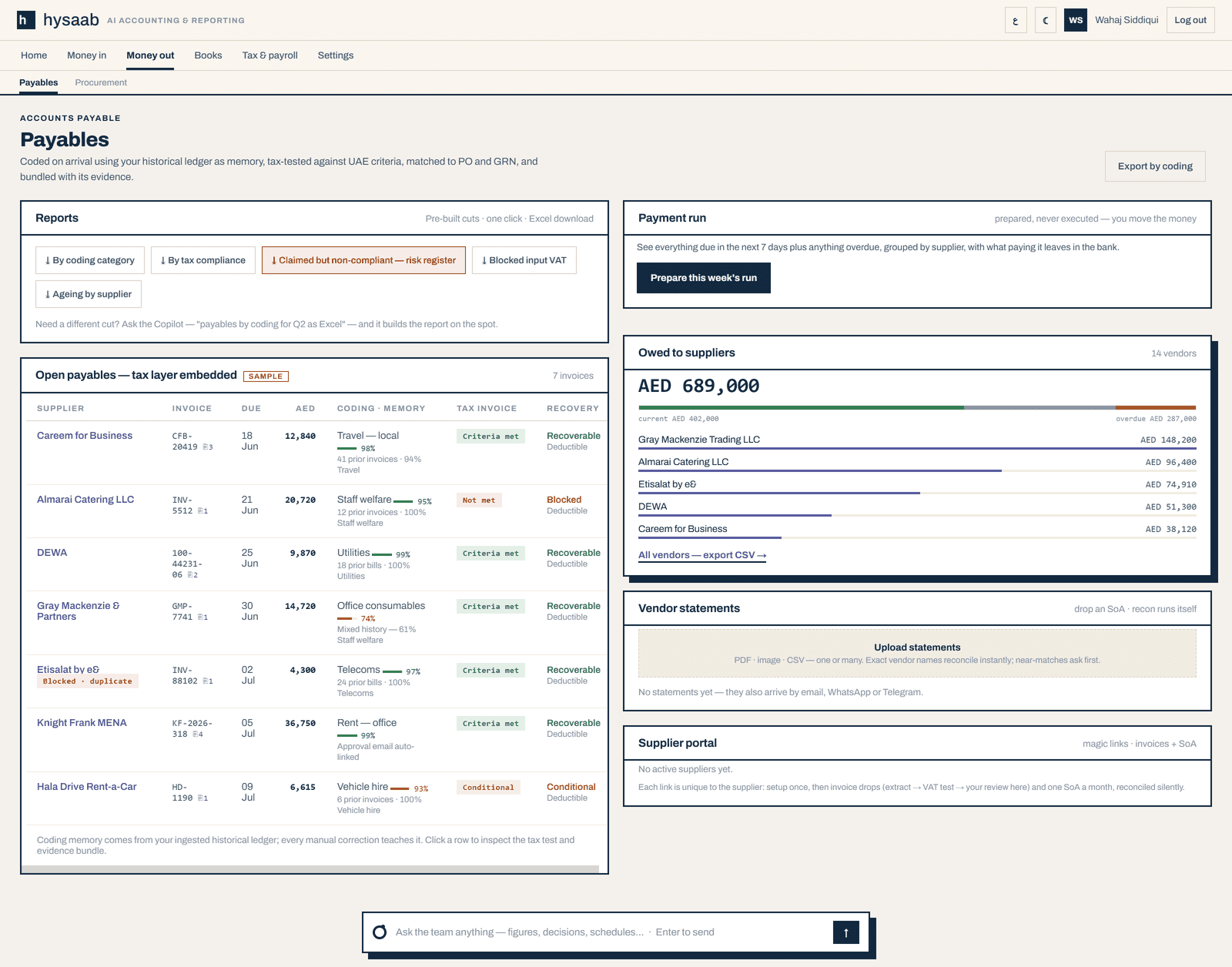
01 / Payables

Bills arrive coded, checked and ready for you.

Send a document by WhatsApp, email or upload. It is read, coded from your own history and tested against the tax-invoice rules before any VAT is claimed. Duplicates are held, not booked twice, and anything uncertain comes to you with the reason.

  • Coding proposed with its confidence and the history behind it
  • Input VAT held until the invoice qualifies
  • Payment runs are prepared for you, never executed for you
Payables, sample data: every open bill with its coding, tax-invoice result and recovery position.
Hysaab payables screen: report downloads, a payment-run panel, the open payables table with coding, tax-invoice result and VAT recovery for each bill, and totals owed by supplier.

Payables, sample data: every open bill with its coding, tax-invoice result and recovery position.

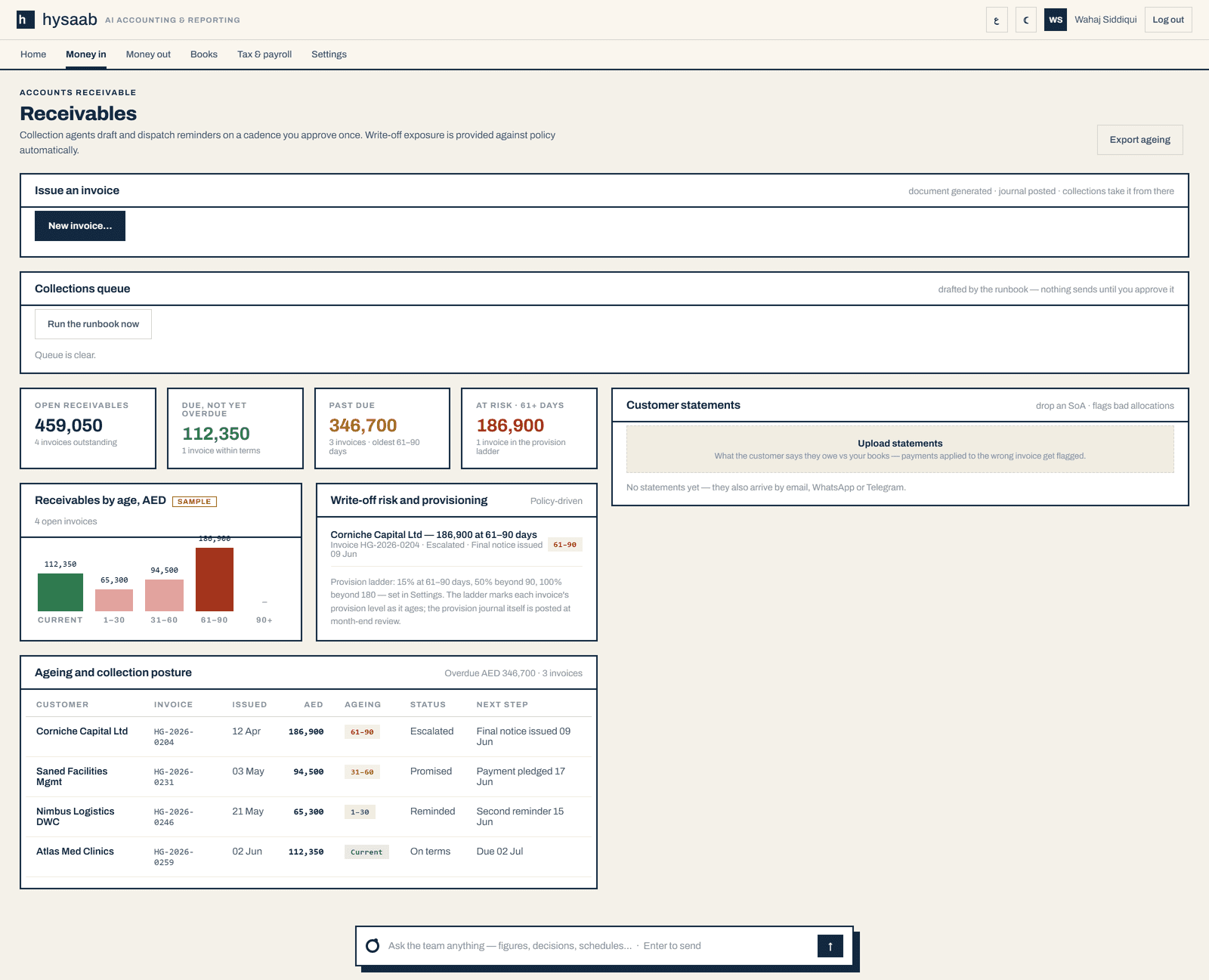
02 / Receivables

Polite, persistent, and on a cadence you approve.

Reminders are drafted inside a collections cadence you set once, and nothing sends until you approve it. Ageing, promises to pay and provision exposure sit on one screen, measured against your own policy.

  • Ageing and the next step for every open invoice
  • Provisioning follows the ladder you set
  • Customer statements are reconciled against your books
Receivables, sample data: ageing, status and the next collection step for each invoice.
Hysaab receivables: every invoice still owed with customer, issue date, amount, ageing band, status and next collection step, beside the customer statements drop.

Receivables, sample data: ageing, status and the next collection step for each invoice.

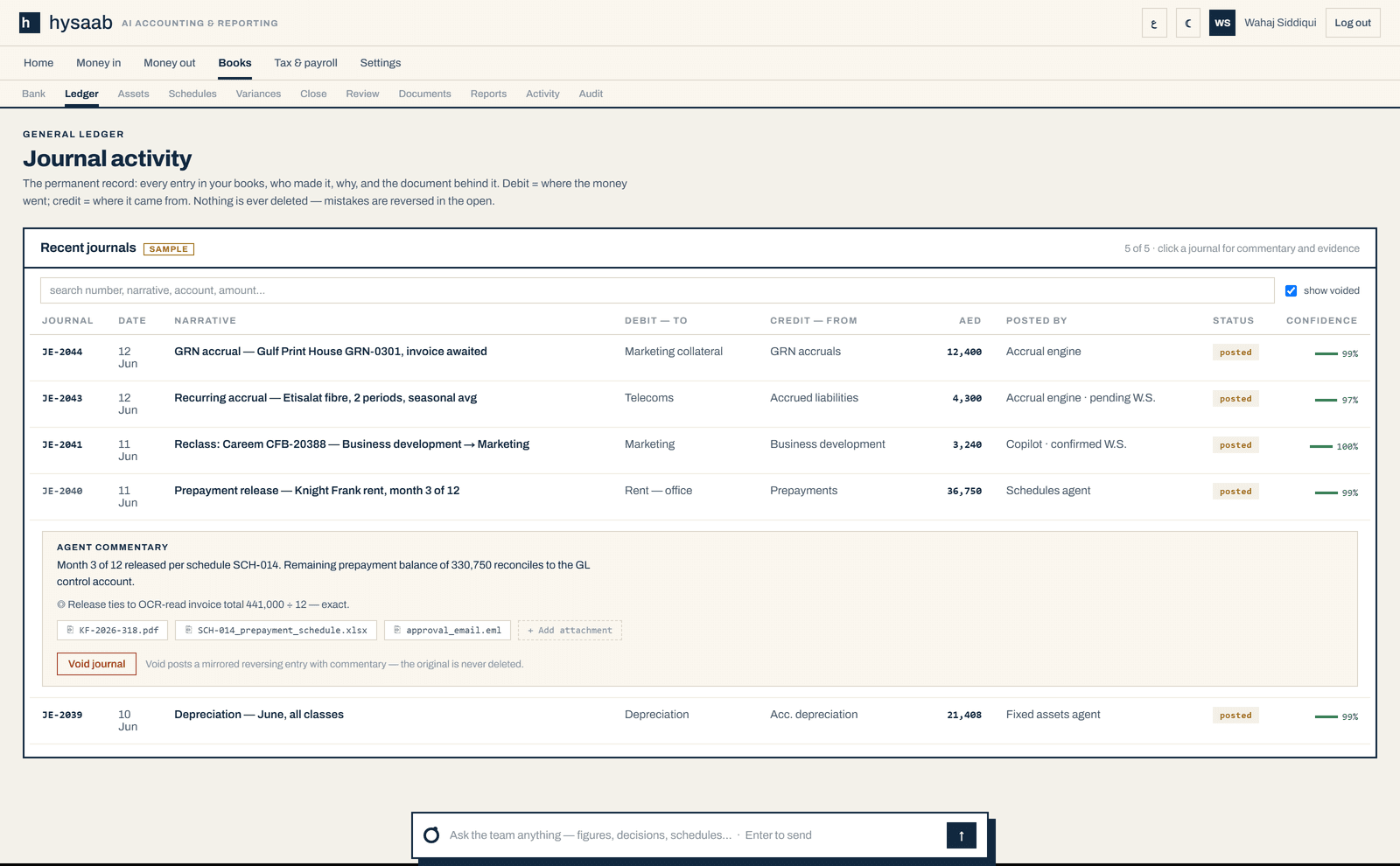
03 / Ledger

Every journal explains itself.

Each entry keeps who posted it, who confirmed it, the commentary and the documents behind it. Open any number and see why it is there. Mistakes are reversed in the open; nothing is deleted.

  • Commentary and evidence attached to the entry
  • Reversals are mirrored entries with their own reason
  • Posts to the accounting system you already use
Journal activity, sample data: one entry opened to its commentary, tie-out and documents.
Hysaab journal activity: posted journals with who posted or confirmed each, and one entry expanded to show its commentary, tie-out and attached documents.

Journal activity, sample data: one entry opened to its commentary, tie-out and documents.

04 / The close

Month-end, run down to a short list.

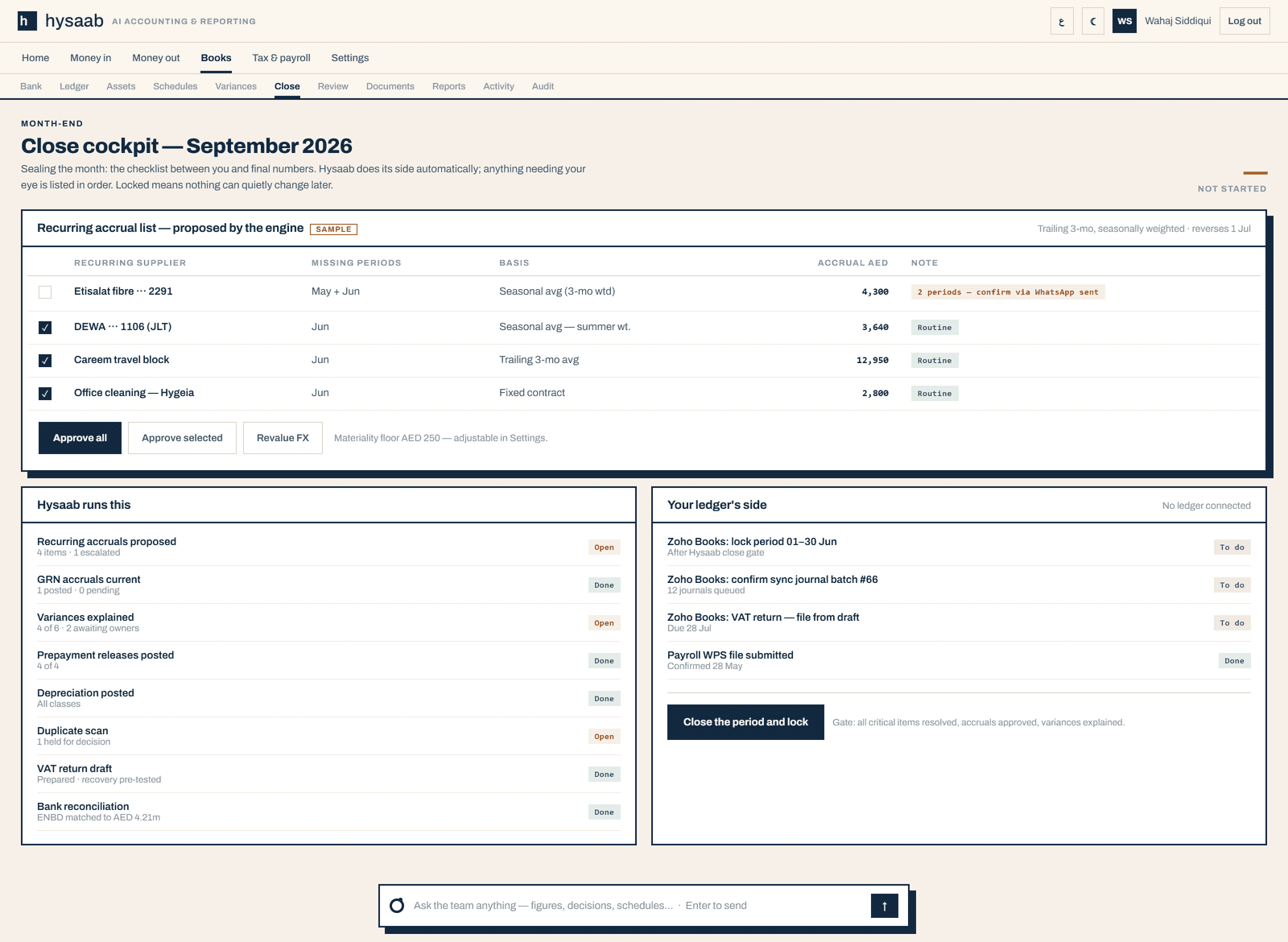
The close cockpit shows what Hysaab has done, what is still open and what needs a person. Accruals are proposed with their basis for you to approve. When the gates are clear you lock the period, and the lock applies to everyone, Hysaab included.

  • Accruals proposed with their basis, approved by you
  • A checklist for Hysaab’s side and for your ledger’s side
  • The period lock is yours to press
The close cockpit, sample data: proposed accruals, the ledger’s checklist and the gated lock.
Hysaab close cockpit: proposed recurring accruals with basis and amount, the ledger’s side checklist, and the button to close and lock the period behind its gate.

The close cockpit, sample data: proposed accruals, the ledger’s checklist and the gated lock.

05 / Documents

A record of everything that arrived.

Every document is filed with the channel it came by and what became of it: coded, matched, reconciled, or held with the reason. The evidence stays one click from the number it supports.

  • Invoices, receipts, statements, purchase orders and approvals
  • Duplicates recognised across channels
  • Quotations and supporting papers attach to their transaction
The intake ledger, sample data: each document with its category, channel and outcome.
Hysaab intake ledger: documents received by WhatsApp, email and bank feed, each with a category and an outcome. One email address is redacted.

The intake ledger, sample data: each document with its category, channel and outcome.

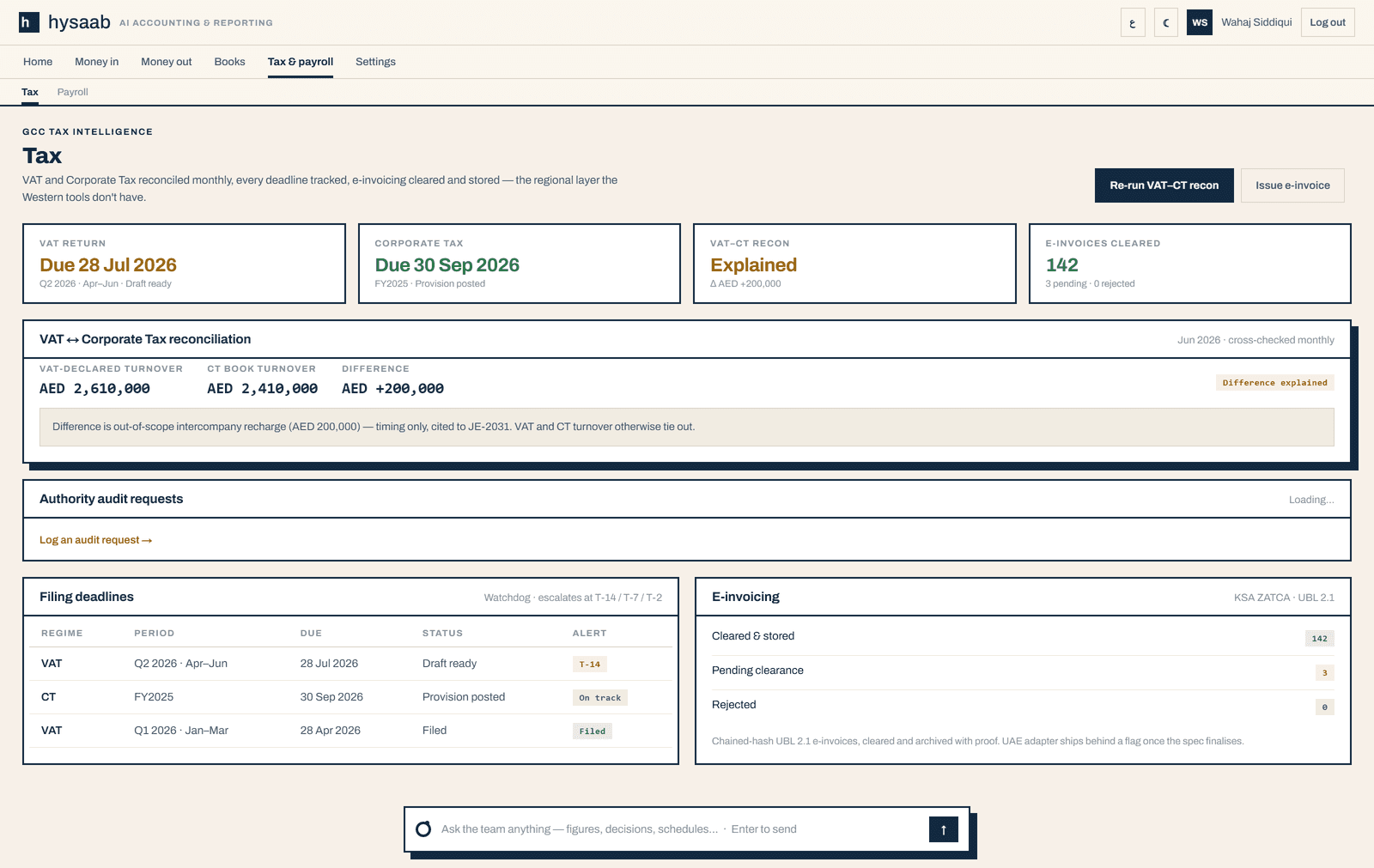
06 / Tax

Checked before you file.

Invoices are tested against the UAE tax-invoice criteria as they arrive, and input VAT is held until a document qualifies. VAT and corporate tax turnover are reconciled to each other each month, with the difference explained, and filing deadlines are tracked.

  • VAT to corporate tax reconciliation, with the difference explained
  • Filing deadlines tracked for each regime
  • You review and file; Hysaab does not submit returns for you
Tax, sample data: the VAT to corporate tax reconciliation and the filing calendar.
Hysaab tax screen: tiles for the VAT return, corporate tax, the VAT to corporate tax reconciliation and e-invoices, the reconciliation with its explained difference, and a table of filing deadlines.

Tax, sample data: the VAT to corporate tax reconciliation and the filing calendar.

02 · Who is it for?

Finance teams with more than one set of books.

From a single company to a group of entities across the UAE and Saudi Arabia, run by your own team or with Oblique’s accountants alongside.

Multi-entity close

Every entity closes on its own checklist.

Switch between entities in one workspace. Each keeps its own books, its own close checklist and its own period lock, and the same approval rules hold in every one of them.

Group reporting

One pack for the group, traced to each entity.

Consolidate the entities and rebuild the management pack from locked ledgers. Each movement is explained in a sentence and traced back to its entry and its document.

One workspace, any shape

One business or five. One currency or five. One language or two.

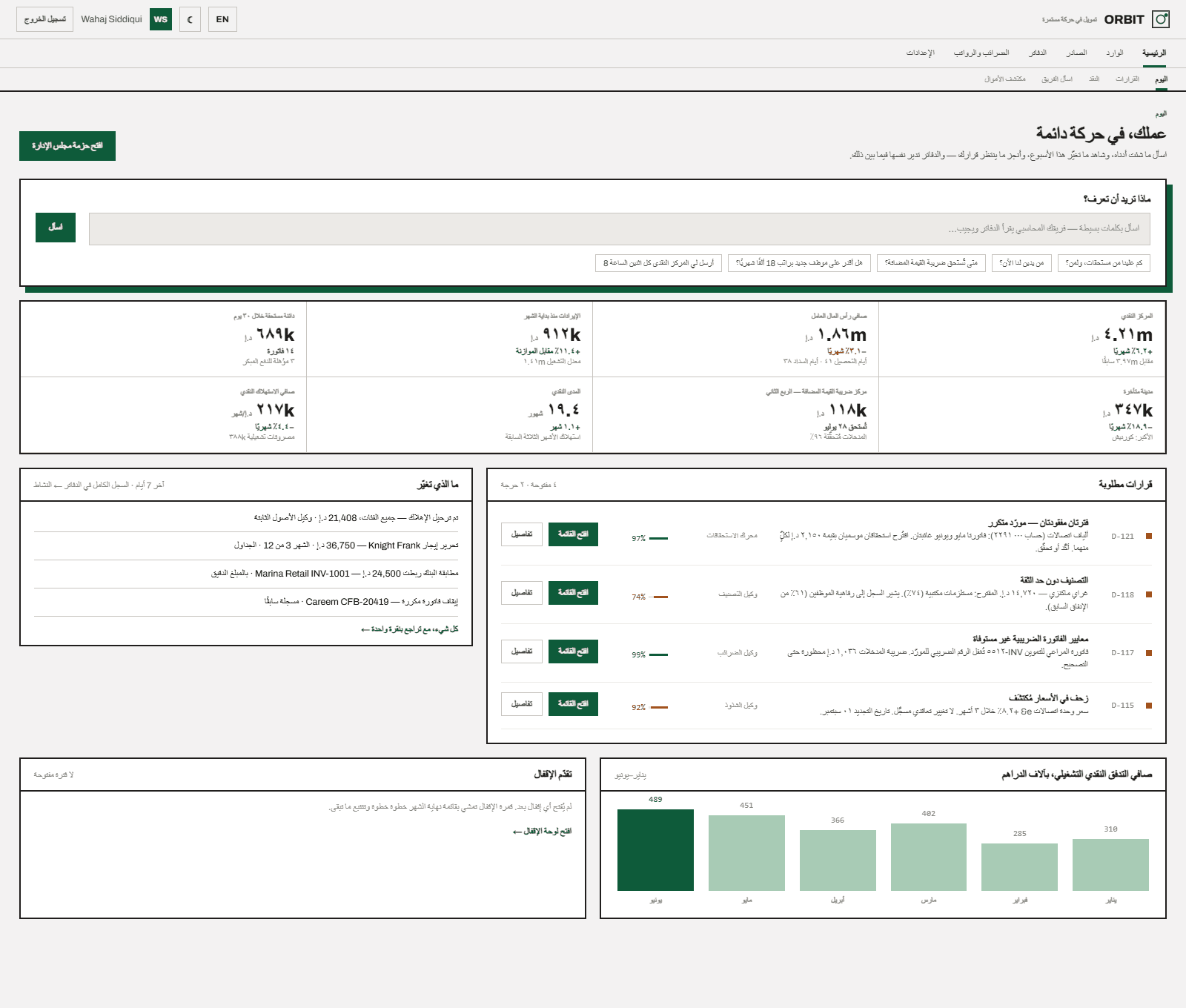
Switch entities, consolidate, and turn the whole workspace to Arabic, right to left, down to the numerals.

The Hysaab workspace in Arabic, right to left, sample data.

The same workspace in Arabic, right to left. Sample data.

03 · How are supplier invoices checked?

Invoice checks, before you claim the VAT.

Every supplier invoice is read, its sums are redone in code and it is tested against the UAE and Saudi tax-invoice rules. A missing TRN, a wrong rate, a duplicate or a supplier whose TRN has changed is held with the reason and the article it fails.

Invoice checks are part of Hysaab Finance. Follow one invoice from the inbox to a claim you can defend.

04 · How does it work?

Documents in. Work prepared.
Decisions with you.

Seventy seconds of the agents at work, below. The full walkthrough goes from a document arriving to a locked period.

One invoice,
start to finish.

A photo lands on WhatsApp. Agents read it, tax-test it against FTA rules, match it to the PO and the bank line, and post it. You approve only what matters.

HYSAAB / ACTIVITY· LIVE
08:14 INTAKE invoice.pdf via WhatsApp
08:14 READER 12 lines · supplier matched
08:15 TAX 5% input VAT ✓ FTA rules
08:15 MATCH PO-0092 ⟷ bank line
08:16 POSTED → Zoho Books ◉

It writes, and it communicates

It reads your books, writes the entries
and chases what’s missing. You approve.

The agents do more than prepare work on a screen. They write to the people the work depends on, on the channels you already use.

Customers

Chases overdue invoices.

Reminders follow the collections cadence you set, with a statement of account from the second reminder. They wait for your approval unless you switch on auto-send for routine ones; escalations always come to you.

Missing documents

Asks for the receipt.

Money that left the bank with no bill behind it gets one friendly ask, on WhatsApp or by email. Reply with a photo and it goes straight into intake.

Your team

Answers on WhatsApp or email.

Send a question or a task. The agents work it against your books and reply on the same channel, with the figures and the entries behind them.

The ledger

Drafts the journal.

Accruals, reclassifications and corrections arrive as drafted journals with their basis. You approve, and they post to the ledger you already use.

The trust ladder

Starts read-only.
Earns write access.

Every connection to your ledger sits on one of three steps. You decide when it moves up, and you can move it back down whenever you like. Most teams trial on drafts, then let routine journals post.

  1. Step 01Observe

    Reads.

    Where every connection starts, and as far as the free Books Check ever goes. Hysaab reads the ledger and compares; nothing is written back.

    Check your books free
  2. Step 02Propose · the trial

    Drafts.

    During the trial, fixes are prepared as drafts: the journal, the reclassification, the bill to post. They wait in Hysaab, or as unposted drafts in your ledger, until you approve each one. You see exactly how Hysaab works before it posts anything.

  3. Step 03Execute · after the trial

    Posts.

    Once the trial has earned it, routine journals post on their own, inside the rules you agreed. You stop approving every entry. Each one is recorded, and anything unusual or below the confidence gate still comes to you.

05 · What stays with you?

Your judgement.
Your boundaries.

The same three rules hold on every screen. Our commitments on data and control set out the rest.

01

Every answer, traceable.

Inspect the entries and documents behind any figure. An explanation you can verify is worth more than one you are asked to trust.

02

Know where to stop.

Approval gates, period locks and control accounts stay in place. A questionable instruction is challenged with the reason, and some are refused outright.

03

Leave a clear record.

The recommendation, the decision taken and the reasoning behind it are stored with the books, not in a separate thread.

06 · What does it cost?

Sized by the work,
not the seats.

No charge per user. We confirm the scope and the fee in writing before you start.

Self-serve · your team runs it

From USD 199 a month

Up to 100 transactions a month, charged once Hysaab works in your accounting system. The agents prepare the work; your team reviews, approves and closes. One connected accounting system, unlimited people.

See pricing

Managed · we run it with you

Scoped to your books

Oblique’s accountants run the queue and prepare the close with you, using Hysaab every day. For mid-sized and larger companies.

Book a demo (opens in a new tab)

Let’s talk

See it on your own books.

Bring one process that takes too long. We will walk it through the workspace with you, then confirm the scope and fees before any commitment.

Request access Book a demo (opens in a new tab)

Hysaab is opening by invitation. Requests are admitted in the order they arrive.